
Constellation Engine
Type-safe pipeline orchestration for Scala
constellation-coreCore types & module systemconstellation-runtimePipeline execution engineconstellation-lang-compilerDSL compiler for .cst filesconstellation-lang-stdlibStandard library functionsconstellation-http-apiHTTP server & dashboardconstellation-lang-lspIDE language serverWhy Constellation?
Type Safety
Compile-time type checking catches field typos and type mismatches before your pipeline runs. No more runtime surprises from field mapping errors.
Declarative DSL
constellation-lang is a readable, hot-reloadable DSL that separates pipeline logic from implementation. Change behavior without recompiling Scala.
Automatic Parallelization
Independent branches in your DAG run concurrently on Cats Effect fibers. The engine handles scheduling and dependency resolution automatically.
Resilience Built In
Retry, timeout, fallback, cache, and throttle are declarative "with" clauses on any module call. No boilerplate resilience code.
IDE Support
VSCode extension with autocomplete, inline errors, hover types, and DAG visualization. Full Language Server Protocol support.
Production Ready
Docker, Kubernetes, auth, CORS, rate limiting, health checks, and SPI for custom metrics and tracing. Deploy with confidence.
Separate Logic from Implementation
Define pipeline structure in the DSL. Implement functions in Scala.
type Order = { id: String, customerId: String, items: List<Item>, total: Float }
type Customer = { name: String, tier: String }

in order: Order

customer = FetchCustomer(order.customerId)
shipping = EstimateShipping(order.id)

# Merge records - compiler validates all fields exist
enriched = order + customer + shipping

out enriched[id, name, tier, items, total]
case class CustomerInput(customerId: String)
case class CustomerOutput(name: String, tier: String)

val fetchCustomer = ModuleBuilder
  .metadata("FetchCustomer", "Fetch customer data", 1, 0)
  .implementation[CustomerInput, CustomerOutput] { input =>
    IO {
      val response = httpClient.get(s"/customers/${input.customerId}")
      CustomerOutput(response.name, response.tier)
    }
  }
  .build
Built For
ML Inference Pipelines
Compose models, feature extraction, and scoring into type-safe DAGs. The compiler validates every field flows correctly between pipeline stages.
API Composition (BFF)
Aggregate backend services with compile-time field validation. Build Backend-for-Frontend layers where field mapping bugs are caught before deployment.
Data Enrichment
Batch processing with Candidates<T>, parallel execution, and automatic dependency resolution. Enrich records from multiple sources in a single pipeline.
Performance
At 50+ modules, your services are the bottleneck
Sustained across 10,000 executions
No growth or degradation over 10K+ runs
Compilation Pipeline
From declarative DSL to parallel execution in six stages
CLI-First Pipeline Operations
Compile, run, visualize, and deploy pipelines from your terminal. Designed for scripting, CI/CD, and fast iteration.
# Type-check a pipeline
$ constellation compile pipeline.cst
✓ Compilation successful (hash: 7a3b8c9d...)

# Execute with inputs
$ constellation run pipeline.cst --input text="Hello, World!"
✓ Execution completed:
  result: "HELLO, WORLD!"

# Generate DAG visualization
$ constellation viz pipeline.cst | dot -Tpng > dag.png

# Check server health
$ constellation server health
✓ Server healthy (uptime: 3d 14h)
# .github/workflows/validate.yml
jobs:
  validate:
    runs-on: ubuntu-latest
    steps:
      - uses: actions/checkout@v4
      - name: Install Constellation CLI
        run: cs bootstrap io.github.vledicfranco:constellation-lang-cli_3:latest.release -o /usr/local/bin/constellation --force
      - name: Validate pipelines
        run: |
          for f in pipelines/*.cst; do
            constellation compile "$f" --json || exit 1
          done
Compile & Run
Type-check pipelines and execute them with inputs from CLI flags or JSON files.
Server Operations
Health checks, metrics, execution management, and pipeline introspection.
Deploy & Canary
Push pipelines, start canary releases, promote or rollback with confidence.
JSON Output
Machine-readable output with --json flag. Deterministic exit codes for automation.
cs channel --add https://vledicfranco.github.io/constellation-engine/channel && cs install constellationInstall via Coursier, or download the fat JAR from GitHub Releases.
Interactive Pipeline Dashboard
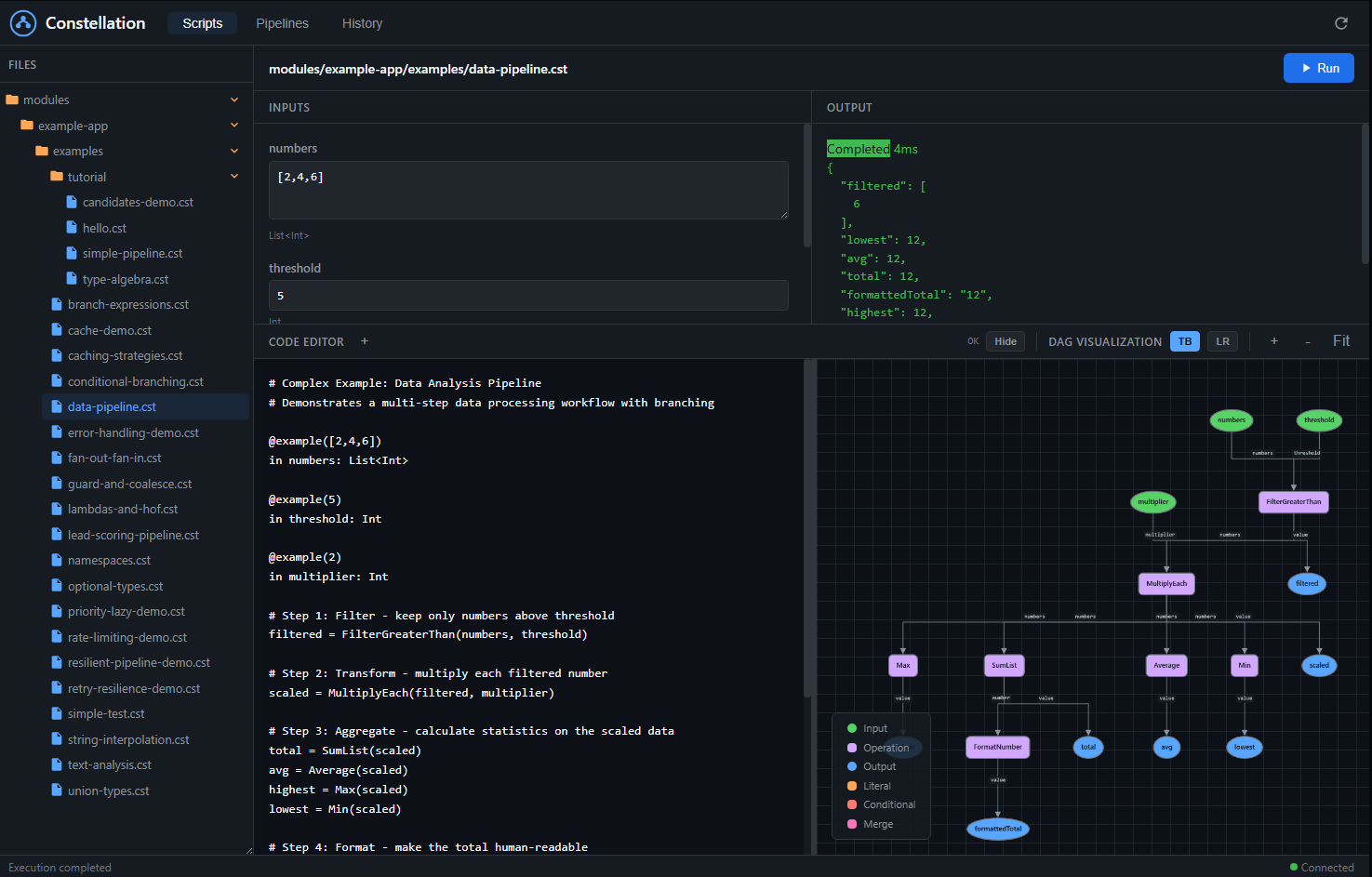
A complete web-based IDE for building, visualizing, and executing pipelines. See your DAG come to life as you write code, with real-time compilation feedback.
File Browser
Navigate your .cst pipeline files with a tree view. Click to load, organize by folders.
Live Code Editor
Write constellation-lang with syntax highlighting. DAG updates as you type with instant error feedback.
DAG Visualization
See your pipeline as a graph. Color-coded nodes for inputs, outputs, operations, and conditionals.
One-Click Execution
Auto-generated input forms based on your pipeline's type signature. Fill values, click Run, see results.
Execution History
Full audit trail of past runs. Filter by script, view inputs/outputs, debug failures with full context.
Node Inspection
Click any node to see its type, execution status, computed value, and duration. Debug at node-level.
Pipeline Management
Load, version, and deploy pipelines. View structural hashes, manage aliases, rollback versions.
Access the dashboard: Start the server and navigate to http://localhost:8080/dashboard. No additional setup required. The dashboard is bundled with the HTTP server and works out of the box.
IDE-Powered Pipeline Development
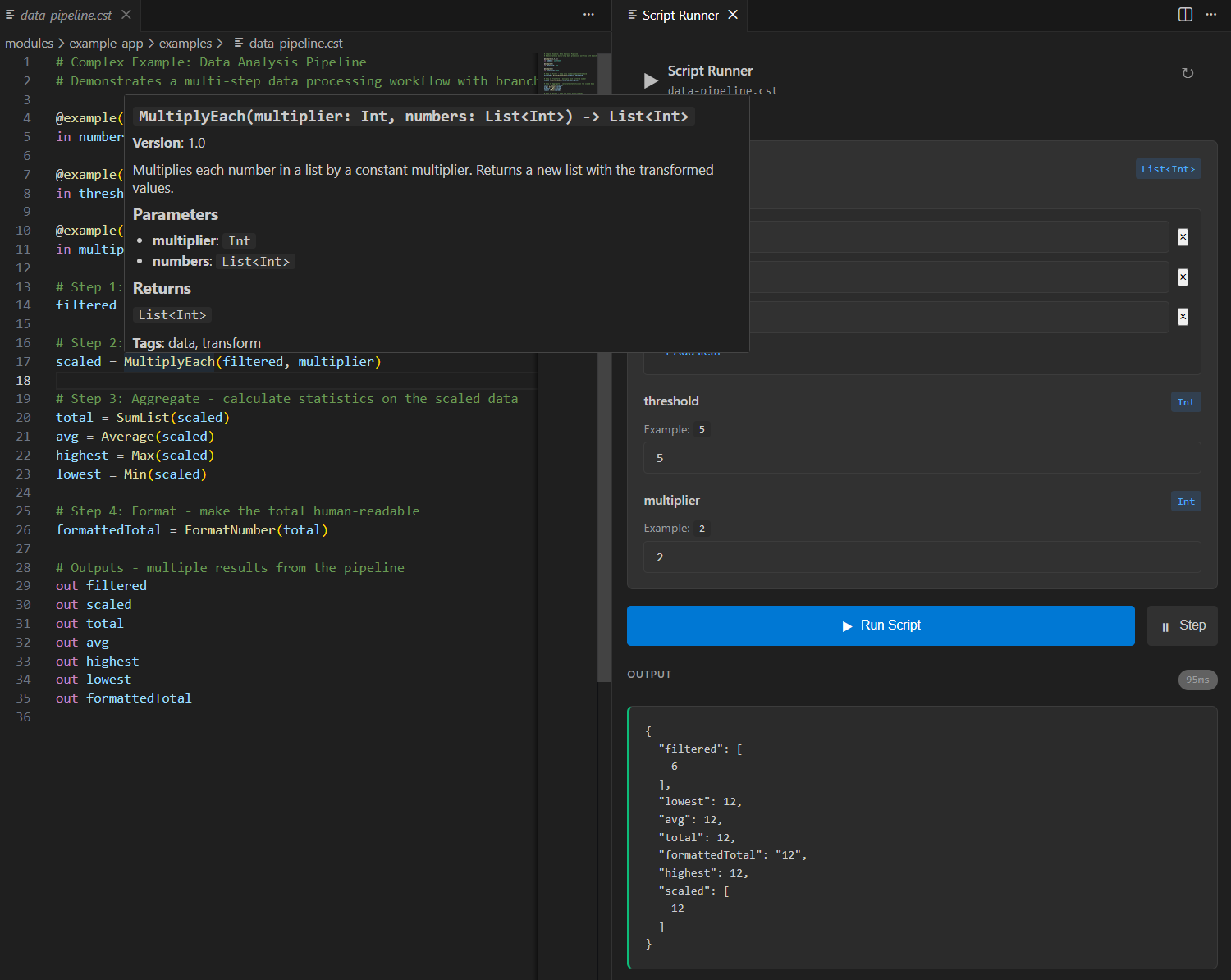
Write modules in Scala, compose them in .cst files with full IDE support. The LSP server connects your Scala definitions to the pipeline editor in real-time.
// modules/DataModules.scala
// Define modules in Scala - LSP exposes them to .cst files

val multiplyEach = ModuleBuilder
  .metadata(
    name = "MultiplyEach",
    description = "Multiplies each number in a list by a constant multiplier",
    majorVersion = 1,
    minorVersion = 0,
    tags = Set("data", "transform")
  )
  .implementationPure[MultiplyInput, List[Int]] { input =>
    input.numbers.map(_ * input.multiplier)
  }
  .build

val filterAbove = ModuleBuilder
  .metadata(
    name = "FilterAbove",
    description = "Filters list to keep only values above threshold",
    majorVersion = 1,
    minorVersion = 0,
    tags = Set("data", "filter")
  )
  .implementationPure[FilterInput, List[Int]] { input =>
    input.numbers.filter(_ > input.threshold)
  }
  .build
Rich Autocomplete
Module names, parameters, and types auto-suggested as you type. No more guessing module signatures.
Hover Documentation
See descriptions, parameter types, return types, and version info directly from your Scala code.
Live Execution
Run pipelines against your deployed server directly from VSCode. See results in milliseconds.
Real-time Diagnostics
Type errors, unknown modules, and field mismatches highlighted instantly as you edit.
How it works: Start the HTTP server with your Scala modules registered. The LSP endpoint (ws://localhost:8080/lsp) streams module metadata to VSCode, enabling autocomplete and validation based on your actual codebase.
Hot, Cold & Canary Deployments
Choose your execution pattern. Use hot pipelines for ad-hoc development workflows, cold pipelines for production APIs with sub-millisecond latency, and canary releases for safe rollouts.
Hot Pipelines: Compile + Run in One Request
Send source code directly to the /run endpoint. The server compiles and executes in a single step. Ideal for ad-hoc queries, development, exploration, and dynamically generated pipelines.
# Hot Pipeline: Compile + Execute in one request
# Send source code directly, get results immediately

# Single request does everything:
POST /run
{
  "source": "in orderId: String\norder = GetOrder(orderId)\nout order",
  "inputs": { "orderId": "ORD-12345" }
}

# Response:
{
  "outputs": { "order": { "id": "ORD-12345", "total": 99.99 } },
  "structuralHash": "sha256:abc123...",
  "compileTimeMs": 87,
  "executeTimeMs": 12
}

# Ideal for:
# - Ad-hoc queries and exploration
# - Development and testing
# - One-time transformations
# - Dynamic pipelines generated at runtime
┌─────────────────────────────────────────────────────────────────────────┐
│                        Pipeline Execution Patterns                       │
├─────────────────────────────────────────────────────────────────────────┤
│                                                                         │
│   HOT PIPELINES (Compile + Run)          COLD PIPELINES (Store + Exec)  │
│   ─────────────────────────────          ────────────────────────────   │
│                                                                         │
│   ┌─────────┐                            ┌─────────┐                    │
│   │ Client  │                            │ Client  │                    │
│   │ Request │                            │ Request │                    │
│   └────┬────┘                            └────┬────┘                    │
│        │                                      │                         │
│        ▼                                      ▼                         │
│   ┌─────────┐                            ┌─────────┐                    │
│   │ POST    │ ←── Source code +          │ POST    │ ←── Reference +    │
│   │ /run    │     inputs in one call     │/execute │     inputs only    │
│   └────┬────┘                            └────┬────┘                    │
│        │                                      │                         │
│        ▼                                      ▼                         │
│   ┌─────────┐                            ┌─────────┐                    │
│   │ Compile │ ←── Every request          │ Lookup  │ ←── By name or     │
│   │ Source  │     compiles fresh         │ Stored  │     structural hash│
│   └────┬────┘                            └────┬────┘                    │
│        │                                      │                         │
│        ▼                                      ▼                         │
│   ┌─────────┐                            ┌─────────┐                    │
│   │ Execute │ ←── ~50-100ms total        │ Execute │ ←── ~1ms           │
│   │ & Return│     (compile + run)        │ & Return│     (no compile)   │
│   └─────────┘                            └─────────┘                    │
│                                                                         │
│   Best for: Ad-hoc, dev, one-time        Best for: Production, APIs    │
│                                                                         │
└─────────────────────────────────────────────────────────────────────────┘
| Feature | Hot Pipelines | Cold Pipelines | Canary Releases |
|---|---|---|---|
| API Pattern | /run (compile + execute) | /compile + /execute | Traffic splitting |
| Execution Latency | ~50-100ms (includes compile) | ~1ms (pre-compiled) | ~1ms (both cached) |
| Reusability | One-time use | Compile once, run many | Versioned deployments |
| Best For | Dev / Ad-hoc / Dynamic | Production APIs | Safe deployments |
Suspended Pipelines with State
Build workflows that span hours, days, or weeks. Pipelines suspend at async boundaries, persist their state, and resume exactly where they left off—even after server restarts.
# customer-onboarding.cst
# Long-lived pipeline that spans days/weeks

type Customer = { id: String, email: String, plan: String }

in customer: Customer

# Day 1: Initial setup
welcome = SendWelcomeEmail(customer.email)
account = CreateAccount(customer)

# SUSPEND: Wait for email verification (async, may take hours/days)
verification = AwaitEmailVerification(customer.id) with suspend: true

# Day 2-3: After verification
profile = CreateUserProfile(account, verification.data)
trial = StartFreeTrial(customer.plan) with suspend_until: "2024-02-01"

# SUSPEND: Wait for trial period or upgrade event
upgrade_or_expire = AwaitFirstOf(
  UpgradeEvent(customer.id),
  TrialExpiry(trial.end_date)
) with suspend: true

# Day 14+: Based on outcome
final_status = branch {
  "converted"  when upgrade_or_expire.type == "upgrade",
  "churned"    when upgrade_or_expire.type == "expiry",
  "pending"    otherwise
}

followup = SendFollowup(customer.email, final_status)

out { customer, status: final_status, timeline: [welcome, verification, trial] }
Durable Execution
State persisted to your storage backend. Survive server restarts, deployments, and failures.
Time-Based Suspension
Use suspend_until for scheduled delays—trial periods, cooling-off windows, SLAs.
Event-Driven Resume
Pipelines wake on external events—webhooks, user actions, third-party callbacks.
Replay & Debug
Inspect any checkpoint. Replay from any state. Debug long workflows without rerunning everything.
Perfect for
Composable Pipeline Architecture
Constellation separates what your pipeline computes from how each step is implemented. The result: pipelines you can visualize, debug, and evolve independently from business logic.
API Composition (BFF)
Aggregate multiple backend services into a single response
// Traditional: Pipeline logic mixed with implementation details
class OrderEnrichmentService(
  orderService: OrderService,
  customerService: CustomerService,
  inventoryService: InventoryService,
  shippingService: ShippingService,
  pricingService: PricingService
) {
  def enrichOrder(orderId: String): IO[EnrichedOrder] = {
    for {
      order <- orderService.getOrder(orderId)

      // Parallelization logic embedded in business code
      (customer, inventory, shipping) <- (
        customerService.getCustomer(order.customerId)
          .handleErrorWith(_ => IO.pure(defaultCustomer)),
        inventoryService.checkStock(order.items)
          .timeout(5.seconds)
          .handleErrorWith(_ => IO.pure(unknownStock)),
        shippingService.estimate(order.address)
          .timeout(3.seconds)
          .handleErrorWith(_ => IO.pure(defaultShipping))
      ).parMapN((c, i, s) => (c, i, s))

      // Retry logic scattered throughout
      pricing <- retryWithBackoff(
        pricingService.calculate(order, customer.tier),
        maxRetries = 3, initialDelay = 100.millis
      )

      // Manual field mapping - typos not caught at compile time
      enriched = EnrichedOrder(
        id = order.id,
        customerName = customer.name,
        items = order.items,
        stock = inventory.available,
        shipping = shipping.estimate,
        total = pricing.total,
        discount = pricing.discount
      )
    } yield enriched
  }
}
# order-enrichment.cst
# Declarative pipeline - defines WHAT to compute, not HOW

in orderId: String

# Each line declares a data dependency
# Runtime automatically parallelizes independent calls
order      = GetOrder(orderId)
customer   = GetCustomer(order.customerId)   with fallback: defaultCustomer
inventory  = CheckStock(order.items)         with timeout: 5s, fallback: unknownStock
shipping   = EstimateShipping(order.address) with timeout: 3s, fallback: defaultShipping
pricing    = CalculatePricing(order, customer.tier) with retry: 3

# Type-safe merge - compiler validates all fields exist
enriched = order + customer + inventory + shipping + pricing

out enriched[id, name, items, available, estimate, total, discount]
- Visualize and debug the data flow without reading code
- Swap implementations (e.g., mock → real) without changing the pipeline
- Reuse the same modules across different pipelines
- Let the compiler catch field typos and type mismatches